hapheus/cf-tunnel-dashboard
Web management dashboard for cf-docker-tunnel-sync
6.9K
hapheus/cf-tunnel-dashboard repository overview
📊 Cloudflare Tunnel Dashboard



💡 Optional Companion Frontend:
hapheus/cf-tunnel-dashboardis an optional visual web frontend forhapheus/cf-tunnel-sync. The core sync daemon runs completely headless and does not require this container to synchronize tunnels and DNS.
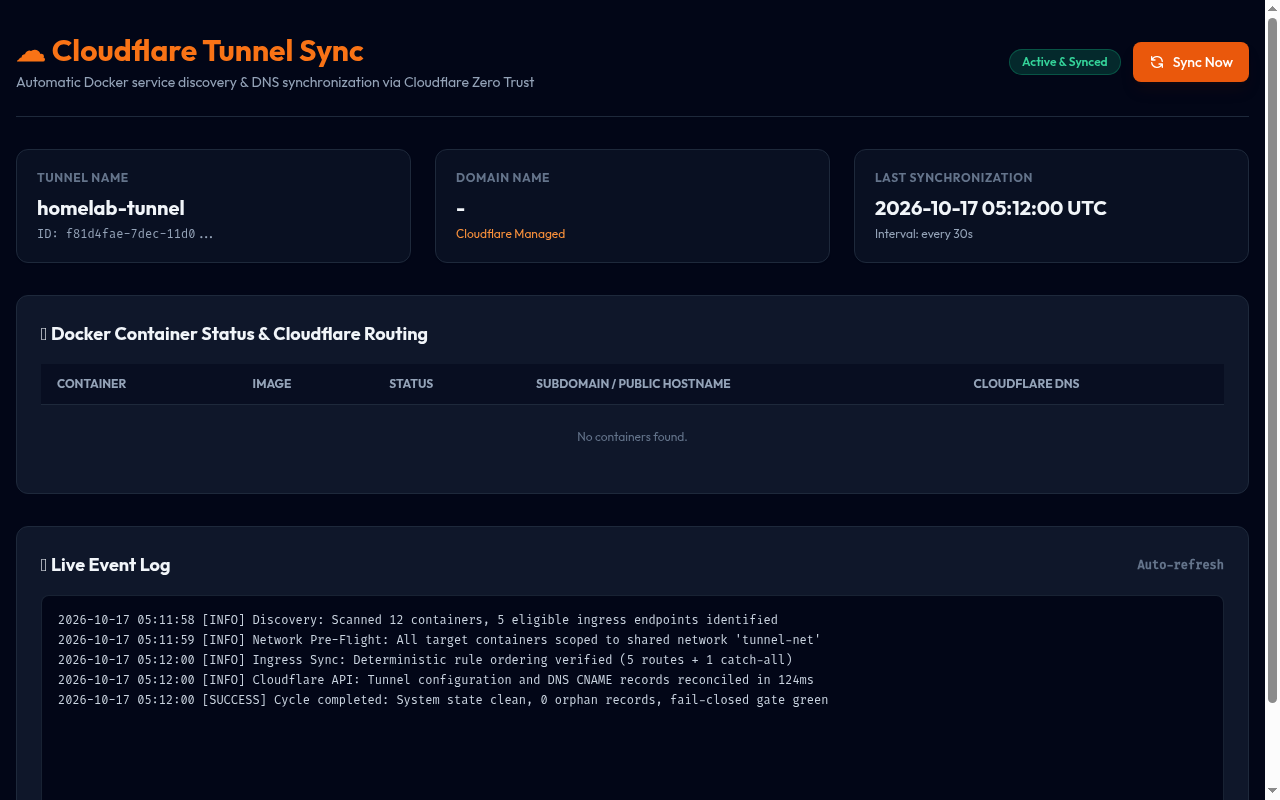
hapheus/cf-tunnel-dashboard is the dedicated web UI and monitoring frontend for hapheus/cf-tunnel-sync. It provides an operator dashboard to inspect Cloudflare Tunnel connectivity, discovered Docker containers, dynamic ingress routes, DNS synchronization states, and system logs.
The image is a lightweight Nginx container (~28 MB) configured with reverse-proxy routing to cf-tunnel-sync and built-in HTTP Basic Authentication.
📸 Dashboard Preview
✨ Features
- 🌐 Real-time Tunnel Status: Live connection state, tunnel ID, active connector status, and Cloudflare API health.
- 🐳 Docker Container Inspection: Visual overview of all discovered containers, ingress rules, hostnames, and target ports.
- 🛡️ Built-in Security: Optional HTTP Basic Authentication (fail-closed if credentials are missing when auth is enabled).
- 🔒 Sanitized DOM Sinks: Strict DOMPurify sanitization preventing stored XSS from untrusted container labels.
- 📱 Modern UI: Responsive layout optimized for mobile and desktop screens.
- 🩺 Health Check Endpoint: Unauthenticated
/healthendpoint returning{"status":"healthy"}for container health monitoring.
🚀 Quick Start with Docker Compose
Deploy the dashboard alongside cf-tunnel-sync on the shared Docker network:
services:
  cf-tunnel-dashboard:
    image: hapheus/cf-tunnel-dashboard:latest
    container_name: cf-tunnel-dashboard
    restart: unless-stopped
    ports:
      - "8080:80"
    environment:
      - DASHBOARD_AUTH_ENABLED=true
      - BASIC_AUTH_USERNAME=admin
      - BASIC_AUTH_PASSWORD=choose_a_strong_password
    networks:
      - tunnel_sync_net

networks:
  tunnel_sync_net:
    external: true
Run the container:
docker compose up -d
Open your browser at http://localhost:8080 (or your host IP) and log in with your configured Basic Auth credentials.
⚙️ Configuration Reference
| Variable | Default | Description |
|---|---|---|
DASHBOARD_AUTH_ENABLED | true | Require HTTP Basic Authentication (true or false). |
BASIC_AUTH_USERNAME | none | Username for Basic Auth (required when auth is enabled). |
BASIC_AUTH_PASSWORD | none | Password for Basic Auth (required when auth is enabled). |
SYNC_BACKEND_HOST | cf-tunnel-sync | Hostname of the cf-tunnel-sync backend API container. |
SYNC_BACKEND_PORT | 8090 | Internal port of the cf-tunnel-sync backend API. |
Security Note: When
DASHBOARD_AUTH_ENABLED=true, bothBASIC_AUTH_USERNAMEandBASIC_AUTH_PASSWORDmust be provided. If either is missing, the container fails closed and exits immediately with an error to prevent unauthenticated access.
🌐 Exposing the Dashboard via Cloudflare Tunnel (Optional)
The dashboard is not exposed to the public Internet by default. If you wish to route it through your Cloudflare Tunnel, add tunnel labels to the dashboard service:
services:
  cf-tunnel-dashboard:
    image: hapheus/cf-tunnel-dashboard:latest
    container_name: cf-tunnel-dashboard
    restart: unless-stopped
    labels:
      - "cf.tunnel.hostname=tunnel-sync.example.com"
      - "cf.tunnel.port=80"
    environment:
      - DASHBOARD_AUTH_ENABLED=true
      - BASIC_AUTH_USERNAME=admin
      - BASIC_AUTH_PASSWORD=choose_a_strong_password
    networks:
      - tunnel_sync_net
Recommendation: When exposing the dashboard publicly, keep Basic Authentication enabled and configure a Cloudflare Access (Zero Trust) application in front of the hostname for multi-factor authentication.
🔗 Related Resources
- Core Sync Image:
hapheus/cf-tunnel-sync - 10-Minute Canonical Quickstart: github.com/hapheus/cf-docker-tunnel-sync/blob/main/QUICKSTART.md
- Source Code & Issue Tracker: github.com/hapheus/cf-docker-tunnel-sync
- Report an Issue: github.com/hapheus/cf-docker-tunnel-sync/issues
Tag summary
Content type
Image
Digest
sha256:9d7e2b107…
Size
27.8 MB
Last updated
about 11 hours ago
docker pull hapheus/cf-tunnel-dashboard